
Every growing Salesforce org eventually runs into the same wall. It doesn’t happen overnight — it creeps quietly; one record at a time. Counsellors log activities, systems sync in updates, and month after month, the Activity object just keeps getting bigger. Nobody deletes anything because the data might be needed someday for a report, an audit, or a customer’s query. So, it stays. And stay. And stay.
Until one day, someone opens a report, and it takes forever to load. A simple search for a customer’s history starts timing out. The sales team complains that the CRM feels “slow.” And when you dig into it, the answer is almost always the same: the object has grown so large that Salesforce itself is struggling to query through it efficiently.
This is exactly the problem we set out to fix — and the result is what we’re calling for the Activity Data Archive Framework.
The Real Challenge Behind “Slow Salesforce”
It’s tempting to blame performance issues on org limits, poor indexing, or bad configuration. Sometimes that’s true. But very often, the real culprit is simpler: too much historical data sitting inside a live, transactional object that was never meant to hold years of records.
Old activity logs from two or three years ago are rarely needed for day-to-day work. But they can’t just be deleted either — they matter for audits, historical reporting, and the occasional “what happened with this customer back in 2023?” question. The challenge isn’t about getting rid of old data. It’s about moving it somewhere it won’t slow everything else down, while still keeping it just as accessible when someone actually needs it.
That’s the exact gap this framework fills.
The Idea: Archive It, Don’t Just Store It
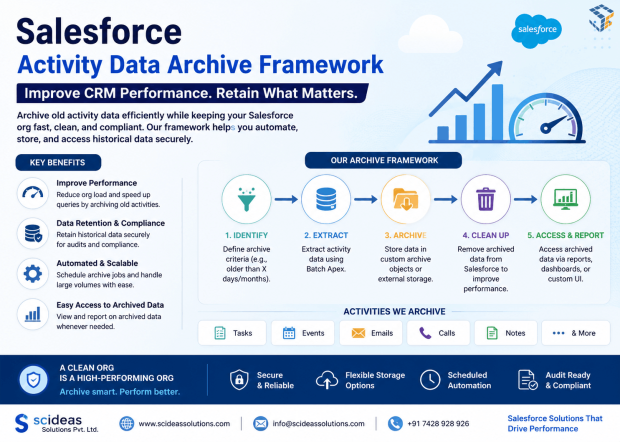
Instead of letting historical records pile up inside the live object, the framework periodically pulls them out, converts them into clean CSV files, and stores those files securely inside Salesforce Files. Think of it like moving old paperwork out of a crowded office desk and into a well-organized filing cabinet down the hall — it’s still just as available; it’s just no longer cluttering the space you use every day.
A scheduled batch process handles the extraction. It reads through the activity records, pulls out the fields that matter, and writes them into structured CSV files. If there’s a huge amount of data to move, the process is smart enough to split it across multiple files instead of creating one massive, unwieldy archive — so nothing ever gets too large to handle efficiently.
Once those CSV files are ready, they’re stored as Salesforce Files. This keeps everything native to the platform — no external storage, no third-party integration, no extra security review for outside systems. The data never technically leaves Salesforce; it just moves into a quieter corner of it.
Bringing the Archive Back to Life When You Need It
Archiving data is only half of the problem. If moving records into cold storage meant users could never search through them again, this wouldn’t be a solution — it would just be a slower way to lose access to history.
So, the framework includes a Lightning Web Component built specifically for exploring the archive. It’s simple by design: pick an archive file, search by mobile number, narrow it down with a start and end date, and page through the results like you would with any normal list view.
Behind the scenes, when someone runs a search, an Apex service opens the selected CSV file directly from Salesforce Files, reads its contents, and converts each row into a structured object the interface can work with. Filters get applied, results get paginated, and everything is handed back to the Lightning component to display in a clean, familiar data table — no different from browsing records the “normal” way, except the live object was never touched.
Why This Approach Actually Works
The beauty of this framework is that it doesn’t ask organizations to compromise. You don’t have to choose between “keep everything and suffer the performance hit” or “delete old data and lose your history.” It gives you both — a lean, fast transactional object for daily work, and a fully searchable archive for everything that came before.
It’s also built entirely on tools already native to Salesforce. There’s no external database, no separate storage service to maintain, no additional vendor to manage. Everything — the batch process, the file storage, the search interface — lives inside the platform your team already knows.
And because it’s structured as a reusable package, it isn’t a one-off fix built for a single org. It’s designed to be installed, configured, and put to work anywhere the same problem shows up — which, if you’ve worked with Salesforce long enough, is almost everywhere eventually.
What This Means Day to Day
For end users, very little changes — searching for historical activity still feels quick and familiar, just through a dedicated archive screen instead of the main object. For admins, the benefit is far bigger: a transactional object that stays lean, reports that run faster, and one less thing to worry about as data volumes keep climbing year after year.
For business as a whole, it means historical data isn’t a liability anymore. It’s still there, still searchable, still ready for an audit or a customer’s query — it’s just no longer sitting in the way of everyday performance.
Final Thought
Data growth in Salesforce is inevitable. Every org that lasts long enough will eventually face the same choice: let old records quietly slow everything down, or build a proper home for them. The Activity Data Archive Framework is that home — a simple, native, and scalable way to keep your history without letting it hold your platform back.