
As we know, Salesforce CRM is a widely used CRM among all kinds of CRM. To manage the consumption of space in Salesforce, there are several tools available. Among all the tools, SharePoint is one of them. We will see how we can integrate SharePoint With SalesForce and what the advantages of using SharePoint are. How is it beneficial for the business to reduce costs as well as manage the documents and different kinds of files stored in SharePoint? Implementation includes data retrieval, updating the data, deleting and saving the data from SharePoint, and using it in Salesforce as we want. This article is speculative about this and how the Scideas Solution can help you to do this for your business.
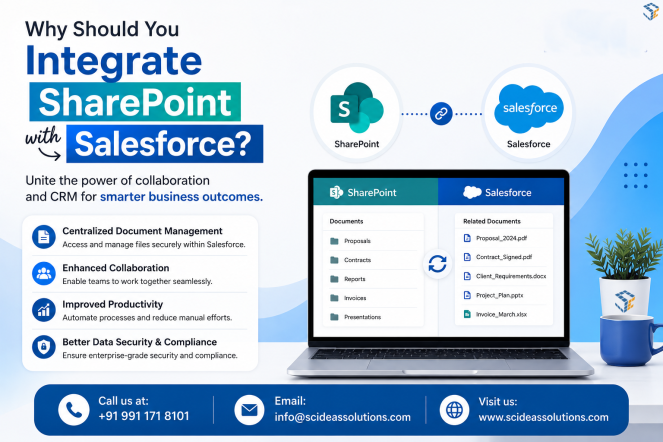
Objective of SharePoint Integration with Salesforce:
This integration will help you to combine Salesforce with Microsoft SharePoint Online to provide a centralized and secure document management solution while reducing Salesforce file storage consumption
How we can do this:
Whenever users upload files against business records such as *Accounts, Contacts, Cases, Opportunities, Contracts, or Email Messages, Salesforce automatically processes the files and uploads them to SharePoint using the Microsoft Graph API.
What is the advantage of doing this:
To improve performance and handle large volumes of files, asynchronous processing is used for uploads. Failed uploads are automatically retried through a Batch Apex job. After a successful upload, Salesforce files can be deleted to reduce storage usage while users continue accessing documents directly from SharePoint through Lightning components.
End-to-End Flow:
ContentVersion → ContentDocumentLink → Triggers → SharePointUploadFuture → SharePointService → Microsoft Graph API → SharePoint → SharePoint_File__c → LWC
How it would be beneficial for the Business:
- Centralized document management in SharePoint.
- Reduced Salesforce storage costs.
- Secure file storage using Microsoft Graph API. Automatic folder creation based on Salesforce records.
- Reliable upload process with automatic retry for failed uploads.
- Seamless document access from Salesforce through SharePoint links.
- Eliminates the need for additional Salesforce storage purchases.
- Centralizes document storage in Microsoft SharePoint.
- Provides secure document access and version control.
- Automatically uploads and organizes files.
- Supports automatic cleanup through a daily scheduled batch.
- Maintains a seamless user experience within Salesforce.
- Improves scalability and reduces long-term storage costs.
- Reduces Salesforce file storage consumption.
We are also explaining this through the FAQ on why you should do this. How the Scides Solution will help you. Apart from that, if you want more information, we will be happy to answer. Let’s see some FAQ which help you gain a better understanding of this.
1. Why is it required to integrate SharePoint file storage with Salesforce?
Salesforce provides limited file storage, which can become expensive as document volume grows. Integrating Salesforce with Microsoft SharePoint enables organizations to store files securely in SharePoint while continuing to manage business records in Salesforce. This approach reduces Salesforce storage consumption, improves collaboration, provides version control, and offers a centralized document management solution.
2. What are the key points we need to take care of?
Before implementing the integration, ensure the following
- Configure *Azure App Registration*.
- Implement *OAuth 2.0* authentication.
- Store SharePoint configuration (Tenant ID, Client ID, Client Secret, Site ID, Drive ID, Folder Paths)
- Configure Microsoft Graph API permissions.
- Design the SharePoint folder structure.
- Identify supported Salesforce objects.
- Implement asynchronous callouts for uploads.
- Add retry logic and error handling.
- Validate file size and API limits.
- Ensure proper Salesforce and SharePoint user permissions.
3. What modules have we implemented to save files?
The SharePoint integration consists of the following modules:
* *Authentication Module* – Generates and manages Microsoft Graph API access tokens.
* *Configuration Module* – Reads SharePoint configuration from Salesforce Custom Settings.
* *File Upload Module* – Uploads files from Salesforce to SharePoint.
* *Folder Management Module* – Creates dynamic folders based on Salesforce objects and records.
* *Metadata* – Stores SharePoint details
* *Retry Module* – Retries failed uploads automatically.
* *Cleanup Module* – Daily Batch Apex removes Salesforce files after successful upload.
* *LWC Module* – Displays SharePoint files directly within Salesforce.
4. How do users access files in Salesforce that are stored in SharePoint?
After a successful upload, the SharePoint file URL and metadata are stored in the custom object SharePoint_File__c. Users can view all related files through a Lightning Web Component (LWC) on the Salesforce record page. Clicking the file opens the document directly in SharePoint, provided the user has the necessary permissions.
5. How do we update or delete files?
For updating the file:
* If a file needs to be renamed or updated, the integration calls the Microsoft Graph API to update the document in SharePoint.
* The corresponding metadata in SharePoint_File__c is also updated to keep Salesforce synchronized.
For deleting files:
* A scheduled *Batch Apex* job runs daily to identify files that have been successfully uploaded to SharePoint.
* The batch deletes the corresponding Salesforce ContentDocument records while retaining the SharePoint document and its URL in Salesforce.
* This ensures storage optimization without affecting user access.
6. How will Scideas help you reduce the storage usage requirement without purchasing additional space from Salesforce?
Scideas provides a SharePoint integration solution that automatically transfers Salesforce files to Microsoft SharePoint using the Microsoft Graph API. After a successful upload, only the SharePoint file URL and essential metadata are retained in Salesforce through the SharePoint_File__c object. A scheduled daily Batch Apex job removes the original Salesforce file, significantly reducing Salesforce File Storage usage. Users continue accessing documents seamlessly from Salesforce through SharePoint links, eliminating the need to purchase additional Salesforce storage.
Please feel free to connect with us through our website https://scideassolutions.com/