
In most growing B2B companies, there is an invisible wall between the sales team working in Salesforce and the finance team operating in Sage Intacct. Sales closes a deal, and someone on the finance team has to manually re-key that opportunity into the ERP to generate a sales order. Later, when the customer pays the invoice, finance has to notify sales so they can manually spin up next year’s renewal opportunity.
That workflow survives when you have ten customers. When you scale to hundreds of accounts across different regional entities, billing frequencies, and locations, manual handoffs turn into operational bottlenecks and billing errors.
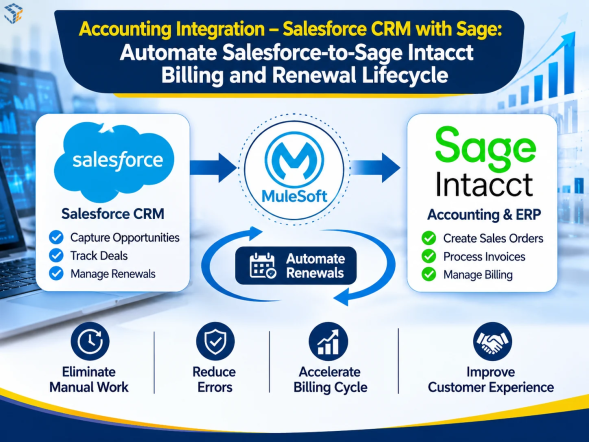
Recently, we built an end-to-end integration to replace those manual handoffs entirely. By combining Salesforce Reports, MuleSoft, and custom Salesforce Apex, we automated the full lifecycle—from generating multi-location Sales Orders in Sage Intacct to creating Renewal Opportunities the moment an invoice is paid.
Here is a practical breakdown of the architecture, the APIs involved, and the design decisions behind it.
High-Level Architecture
The integration is divided into two decoupled phases:
- Outbound Order Sync (Salesforce → MuleSoft → Sage Intacct): Scheduled MuleSoft flows read segmented Salesforce Reports, transform payloads via DataWeave, and create Sales Orders across different Intacct locations and templates.
- Inbound Renewal Sync (Sage Intacct → Salesforce Apex): Once Sales Orders are billed and marked Paid in Intacct, an hourly scheduled Apex job pulls settled invoices and generates next-term Renewal Opportunities automatically.
Part 1: Turning Salesforce Opportunities into Intacct Sales Orders (MuleSoft)
Instead of hardcoding rigid SOQL filters inside our integration layer, we wanted the business operations team to control which deals get billed and when. Our solution was to use Salesforce Analytics Reports as dynamic data sources.
Different opportunity types—whether monthly, annual, or tied to specific regional entities—are segmented into dedicated Salesforce reports. MuleSoft connects directly to these reports on a scheduled cron trigger (alongside manual HTTP listeners for on-demand finance runs).
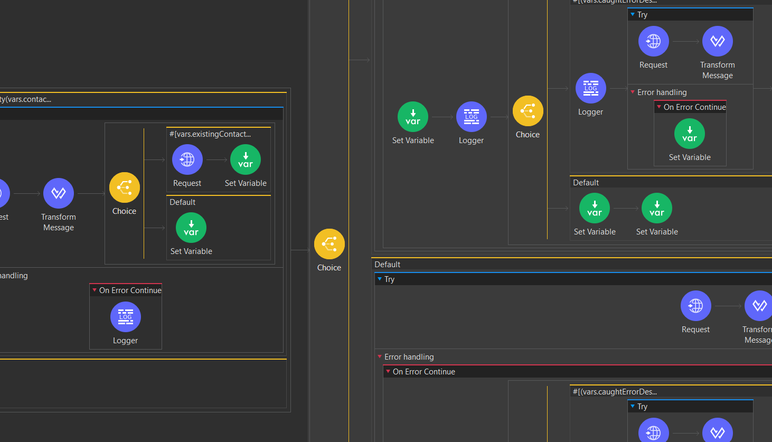
Key Integration Endpoints & Flow Execution:
- Authentication & Report Extraction: MuleSoft authenticates with Salesforce using the OAuth 2.0 Client Credentials flow (/services/oauth2/token) and calls the Salesforce Analytics REST API (/services/data/v59.0/analytics/reports/{reportId}?includeDetails=true) to extract detailed report rows. (Reference: Salesforce Reports and Dashboards REST API Documentation)
- DataWeave Grouping: A single Salesforce Opportunity often contains multiple products. DataWeave groups the flat report rows by OpportunityId so that one Opportunity maps cleanly to one unified Sales Order with multiple line items (sotransitems).
- Dynamic Routing (Locations & Templates): Depending on the report and opportunity attributes, DataWeave dynamically assigns the appropriate Sage Intacct Sales Order template (transactiontype), Location ID, and Department ID, while calculating custom memo billing periods dynamically.
- Creating Sales Orders & Timeout Protection: MuleSoft posts the transformed XML payload to the Sage Intacct XML Gateway ([https://api.intacct.com/ia/xml/xmlgw.phtml](https://api.intacct.com/ia/xml/xmlgw.phtml)) using the create_sotransaction function. (Reference: Sage Intacct Developer Portal & API Documentation) Because ERP APIs can occasionally time out under heavy load, we wrapped the outbound request in a MuleSoft Try scope. If a timeout occurs, the flow queries Intacct’s SODOCUMENT object via readByQuery using the Opportunity ID to verify whether the order was created before marking it as failed—preventing duplicate orders.
Closing the Loop in Salesforce
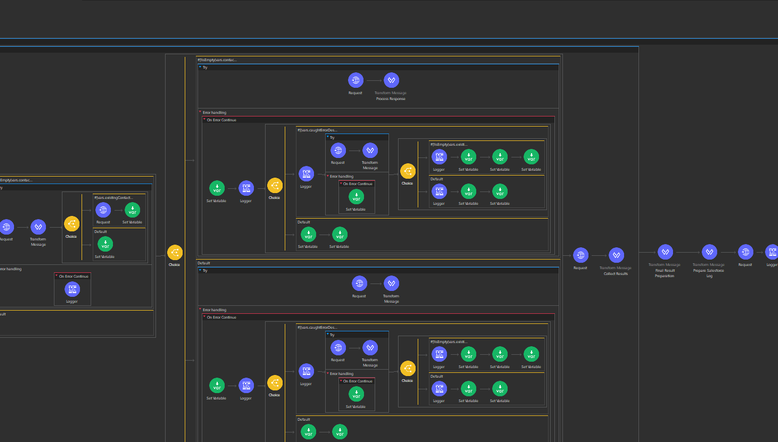
An integration is only reliable when both teams have visibility. Immediately after Sage Intacct processes a Sales Order, MuleSoft executes a PATCH request via the Salesforce SObject REST API (/services/data/v59.0/sobjects/Opportunity/{id}) to update the sync status and store the newly generated Intacct Sales Order Record ID (Sage_Intacct_Id__c) directly on the Opportunity.
Once MuleSoft finishes processing a report, it aggregates the execution metrics—total records processed, succeeded, failed, and specific error details—and inserts a summary record into a custom Salesforce object (Sales_order_logs__c) via the SObject REST API. That record creation triggers an automated Salesforce summary email to stakeholders, providing a complete audit trail after every run.
Part 2: Automating Renewals When Invoices Are Paid (Salesforce Apex)
Generating the Sales Order is only half of the lifecycle. In Sage Intacct, those Sales Orders eventually convert into Accounts Receivable (AR) Invoices. Our business rule was strict: a Renewal Opportunity should only be generated in Salesforce after the customer actually pays the invoice.
Rather than building a separate middleware pipeline for inbound polling, we handled this natively inside Salesforce using a lightweight, hourly Schedulable + Queueable Apex architecture.
Why Queueable Instead of Batch Apex?
Because the sync runs every hour, record volume per execution is steady and manageable (typically under a few dozen invoices). Initializing Batch Apex every hour adds unnecessary overhead to the Flex Queue and requires chaining separate jobs for callouts. By implementing Queueable with Database. AllowsCallouts, an hourly Schedulable job enqueues a single asynchronous transaction that handles both the outbound HTTP callout and all subsequent DML operations.
How the Renewal Engine Works:
- Pulling Paid Invoices (SageIntacctService): Our service class retrieves gateway credentials from Custom Settings (Intacct_Config__c) and sends an XML query callout to the Sage Intacct API ([https://api.intacct.com/ia/xml/xmlgw.phtml](https://api.intacct.com/ia/xml/xmlgw.phtml)), filtering the ARINVOICE object specifically for records where STATE = ‘Paid’ and WHENMODIFIED falls within our recent sync window.
- Matching & Eligibility Validation (OpportunityRenewalService): Because we pass the Salesforce Opportunity ID into Intacct’s DOCNUMBER field during Sales Order creation, matching paid invoices back to their source Opportunities is exact. The service verifies that the source Opportunity is Closed Won, does not already have a renewal linked, and is not flagged as a one-time or non-renewable deal (Case_Billing__c or Sold_Only__c).
- Smart Cloning & SKU Substitution: For qualified Opportunities, Apex creates the next-term Renewal Opportunity, advances contract start and end dates (while preserving original contract dates for specific SOLD structures), copies relevant Contact Roles, and clones Opportunity Line Items—automatically substituting initial products with their designated renewal SKUs and excluding one-time implementation products.
Key Business Outcomes
- Zero Double Data Entry: Finance no longer re-keys line items, customer IDs, or department codes between CRM and ERP.
- Complete Audit Trails: Every Opportunity displays its exact Intacct Sales Order ID, and every scheduled report run generates a permanent log record and email summary.
- Faster Renewal Cycles: Sales reps don’t have to chase finance to check invoice payment status—as soon as Intacct marks an invoice paid, the renewal deal appears in their pipeline within the hour.
Conclusion
The integration of Salesforce CRM with Sage Intacct demonstrates how automation can simplify the complete billing and renewal lifecycle. By combining Salesforce Reports, MuleSoft, and custom Apex services, businesses can eliminate manual data entry, improve billing accuracy, and maintain better visibility across sales and finance operations.
From automatically creating multi-location Sales Orders to generating Renewal Opportunities after invoice payments, this solution ensures that critical business processes remain connected and efficient. With reliable synchronization, detailed audit logs, and automated renewal management, organizations can reduce operational delays and focus more on customer relationships and business growth.
At Scideas Solutions, we help businesses build intelligent CRM and ERP integrations that streamline workflows, strengthen financial operations, and support scalable business growth.